AI-assisted inspection & certification preparation.

SeaReady, the Master’s Companion: prepare for class, flag state, PSC and vetting visits with practical AI help, organised evidence and a clear view of readiness.

SeaReady

From the first check to the final report.

Know what needs attention. Help the crew prepare. Keep the office informed.

SeaReady brings inspection planning, ship-specific checks, photos, notes, findings and certificate dates into one working environment. Use AI to help examine a selected photo, practise an inspector’s questions or understand the evidence to have ready.

Designed for Masters, officers, crew and shore teams, it connects daily operations and maintenance preparation with the inspection ahead. Work by inspection, chapter or ship zone, then turn recorded progress into dated reports and clear follow-up.

See SeaReady at work.

Real SeaReady screens from our demo vessel. Open any image for a closer look.

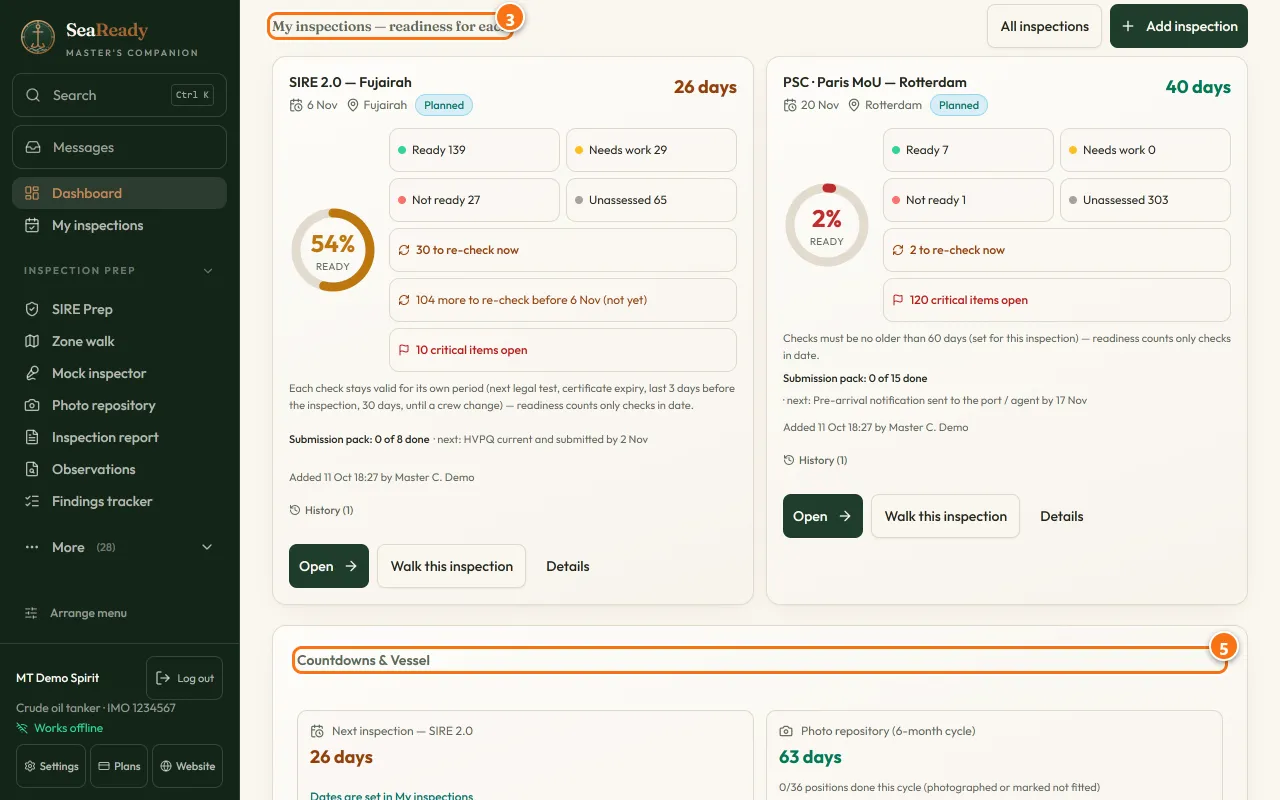
SeaReady demo dashboard showing planned SIRE and Paris MoU inspections, readiness, critical items and deadlines

Your inspection priorities, together.

See upcoming inspections, readiness and checks needing attention before opening the work that matters next.

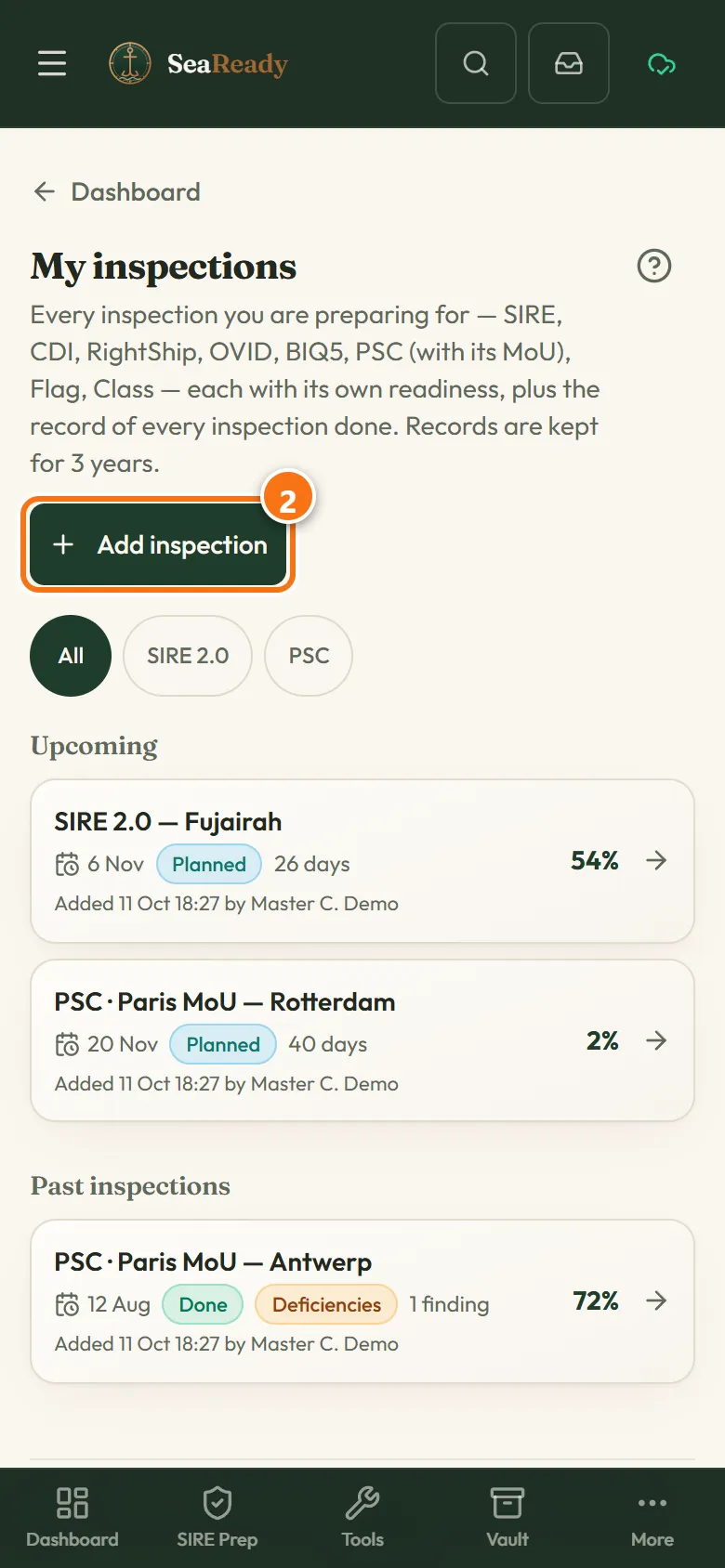
SeaReady mobile demo showing upcoming SIRE and PSC inspections with readiness and past inspection records

A clear plan for each inspection.

Keep upcoming visits and past inspections in one place, with a separate view of readiness for each.

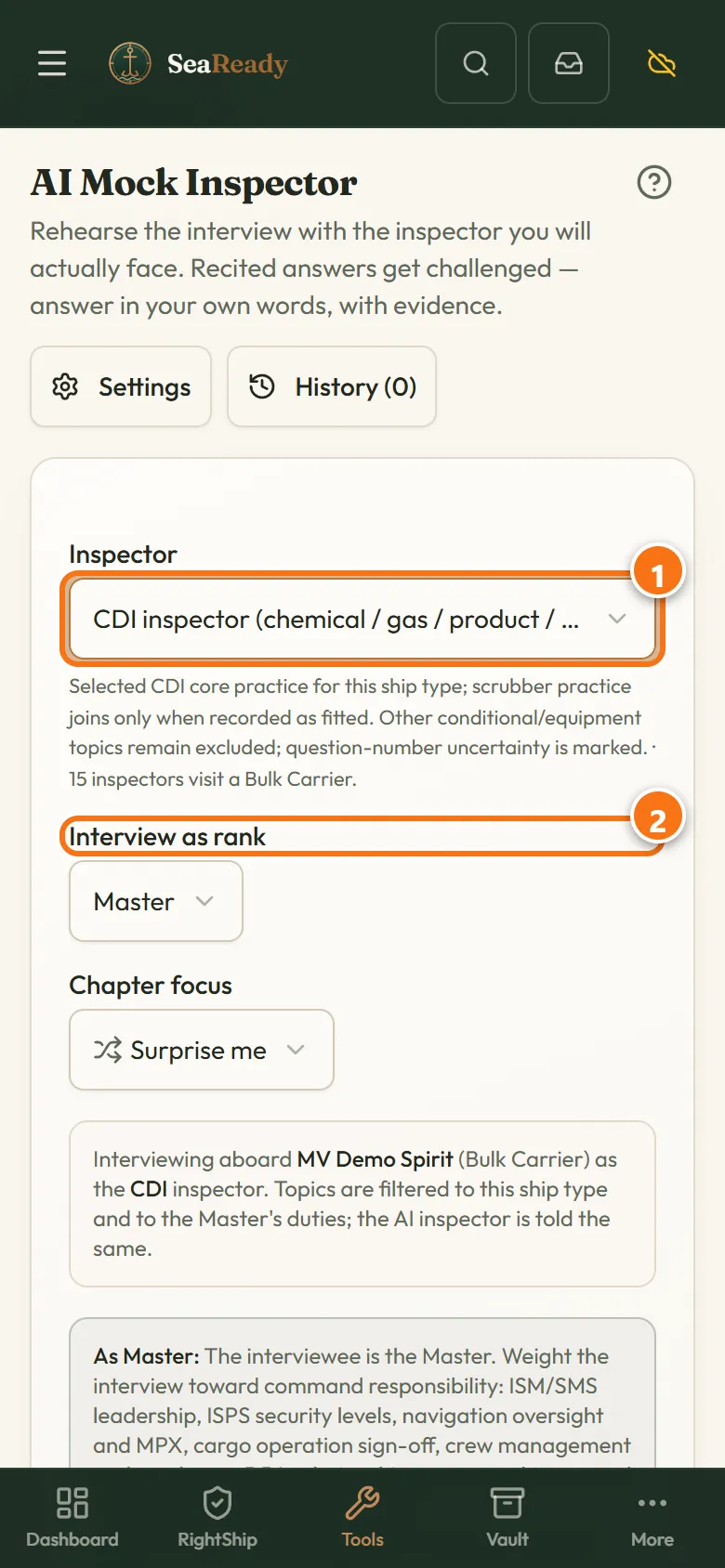
SeaReady AI mock inspector demo with inspector type, crew rank and chapter focus choices

Practise before the inspector arrives.

Choose the inspection, your rank and a focus area to prepare for the questions and evidence you may need.

Demo data and handbook highlights are shown. Available tools depend on the vessel, inspection and plan.

AI help you can use before the inspector arrives.

Photo review, interview practice and explanations grounded in the preparation you are doing.

Review inspection photos with AI

Select a saved photo in the repository and choose “Check this photo with AI”. Ask for visible-condition observations and practical suggestions in the context of the relevant check, then compare the advice with the actual equipment and conditions onboard.

Rehearse with an AI mock inspector

Practise questions for your rank, vessel type and inspection. Receive follow-up questions, feedback on your answers and a debrief that helps identify what to practise next. Eligible plans include dated readiness PDFs; built-in practice is available offline.

Ask, speak and understand

Use the AI assistant and “Explain this simply” to make preparation questions easier to understand. Speak an answer or dictate a note where voice tools are available, then review the text. Language options support crew learning, alongside AI orals practice.

AI tools run when you request them, using internet and the AI allowance on an eligible plan or trial. Review suggestions with the responsible officer. Core offline preparation remains available when there is no signal.

A working toolkit for life onboard.

Turn preparation into manageable daily work, with a clear record of who checked what and when.

Plan around your vessel and next port

Keep separate planned inspections, readiness and history in My inspections. Follow ship-specific chapters or a zone walk, focus on urgent gaps and use next-port PSC guidance, risk windows and inspection campaigns to plan the work ahead.

Keep evidence beside the check

Record Ready, Needs work or Not ready alongside notes, photos and voice notes. Dated answers show who checked the item and when. The photo repository adds shot guidance, refresh dates and a submission contact sheet.

Keep working without a signal

Install SeaReady on your phone and open the preparation you need while connected. Continue core checks and saved reference material offline. Eligible device and ship records sync through the server when internet returns; AI and live updates use a connection.

Turn findings into action and reports

Import inspection findings, assign responsibility, set due dates and record corrective actions and supporting evidence. Follow progress through close-out, prepare submission packs and print or save dated, photo-backed inspection reports as PDFs.

Stay ahead of daily ship duties

Keep certificate and survey dates, drill plans, rest hours, life-saving and fire-fighting service dates, permits and custom checklists close at hand. Crew learning, practical reference material and ship tools support operations and maintenance between inspections.

Give the office useful fleet oversight

On a company ship licence, view reported fleet readiness, planned inspections, critical-item counts, certificate dates and overdue work. Last-report dates show how current the summary is. The office receives readiness summaries while detailed checklist answers, photos and personal records keep their defined onboard privacy.

Which inspections and certificates can you prepare for?

Port State Control and USCG

Prepare for PSC checks under Paris MoU, Tokyo MOU and other regional regimes, with next-port guidance and inspection campaigns. SeaReady also includes USCG port-state preparation and selected US-flag preparation, matched to the available vessel-specific scope.

Vetting, class and flag state

Vetting preparation includes SIRE 2.0, RightShip RISQ, CDI and OVID. Class and flag-state preparation follows the flag, society, vessel type and survey scopes currently available in SeaReady. Select your vessel and inspection to see the relevant checks and evidence requirements.

Certificate records and survey dates

Organise applicable certificate records and track expiry dates and survey windows: Class, Load Line, Cargo Ship Safety Construction, Safety Equipment, Safety Radio, IOPP, IAPP, ballast water, Safety Management Certificate (ISM), International Ship Security Certificate (ISPS), Maritime Labour Certificate and ship-type Certificates of Fitness. Bring the relevant records and supporting evidence together for the inspection or survey.
Fit preparation around the systems you already use.

Keep equipment maintenance jobs and service history in your PMS. Use SeaReady to organise the inspection checks, evidence, crew preparation and follow-up that draw on those records. A separately scoped integration can be discussed through Marvel Solutionz’s Marine IT support.

Start with your ship, your role and the inspection ahead.

Explore the free core tools, then choose the AI, reporting and ship-sharing features that suit your team. SeaReady shows the current plan options, inspection applicability and Handbook guidance so you can see how each tool fits your work.